Mar 13, 2025

Articles

Welcome to Launch

Paul Waweru
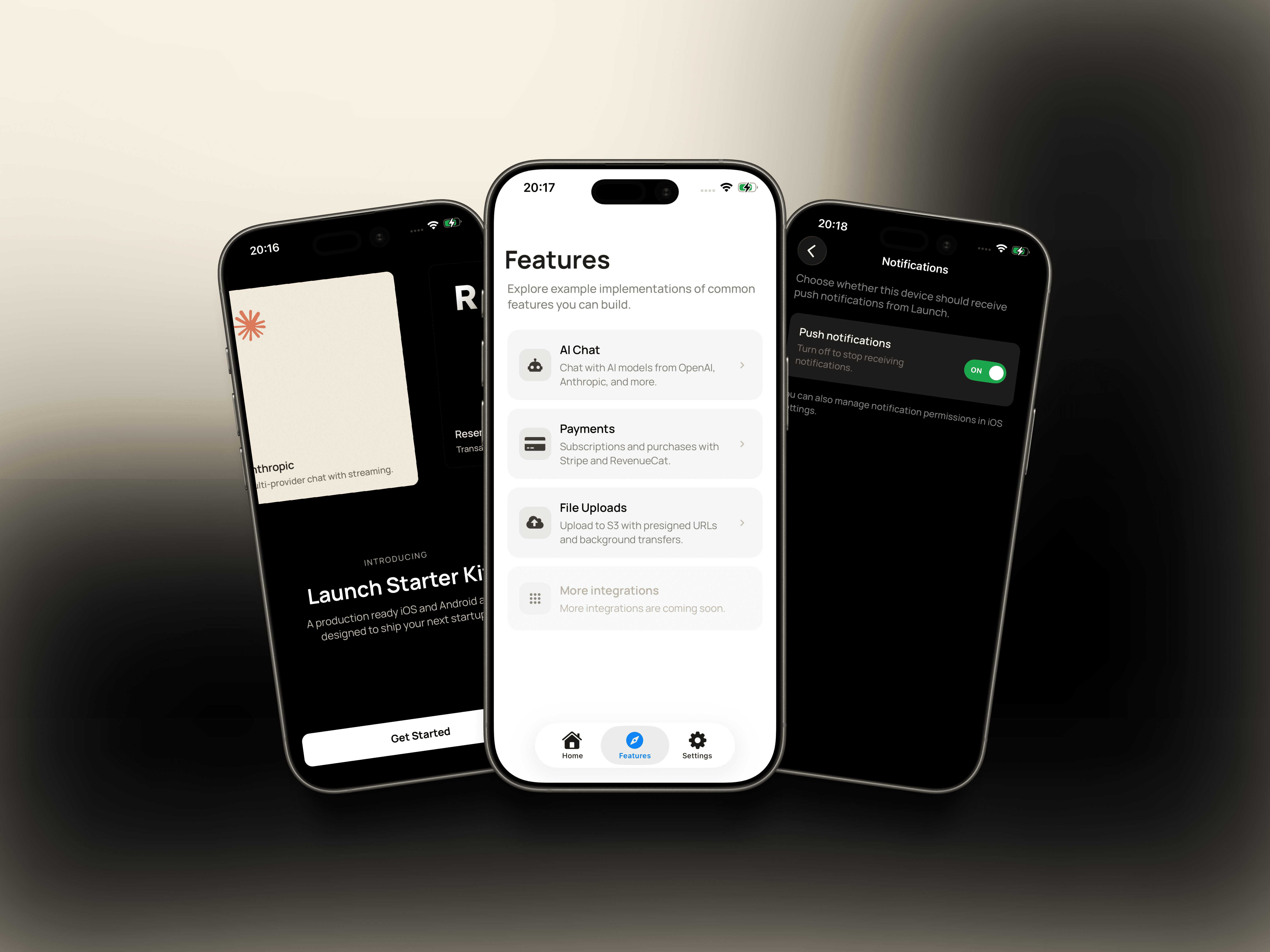
Launch started as a solid React Native Expo starter, but over time it fell behind the pace of Expo and React Native itself. SDK upgrades became harder, patterns aged and the gap between “starter” and “production app” started to show.

This release is a reset.

The goal was not to add more features, but to rebuild Launch on a modern foundation, apply real feedback from builders and ship something that feels current, flexible and easy to grow with again.

Why start again

Two things drove this rebuild.

First, Launch needed a proper reset. Expo and React Native moved quickly, dependencies drifted, and upgrades started to feel like patchwork. Rather than keep patching, I rebuilt on the latest stack, aligned with React Native’s new architecture, and cleaned up the foundations.

Second, candid feedback made the direction obvious: people wanted a starter that’s easier to adapt. Swap features in and out. Avoid early lock-in. Rely on well-supported UI primitives instead of custom one-offs.

This version of Launch is built around that.

A modern Expo base

Launch now ships on Expo SDK 54 (with SDK 55 coming next). This upgrade brings a few meaningful improvements from Expo itself - including support for iOS 26 Liquid Glass icons and effects, stronger alignment with React Native’s New Architecture as it becomes the default going forward, and a more modern platform baseline across iOS and Android.

A cleaner, more consistent UI foundation

Launch ships with HeroUI as the UI foundation — using its core components (buttons, cards, inputs, etc.) as the baseline instead of reinventing UI from scratch. On top of that, you get consistent typography, dark mode, and reusable layout patterns that are designed to scale as the app grows.

The goal isn’t to be flashy. It’s to feel polished and predictable. Small, intentional animations are built in to make the app feel pleasant to use — the kind of subtle motion that makes an MVP feel closer to a real product, without getting in your way.

Full-stack control with a tRPC backend

Backend-as-a-service tools are great, but they come with trade-offs. In practice, having control over your API, database, and deployment often matters more as a product grows.

That’s why Launch ships with a tRPC backend and a Postgres database. You own the stack, deploy it where you want (Railway, your own infra, elsewhere), and keep type safety end-to-end without being locked into a single platform.

It’s a setup designed for control, flexibility, and long-term ownership.

The essentials, wired properly

Launch includes the things most real apps eventually need:

  • Payments with Stripe, RevenueCat, and Superwall

  • Secure file uploads

  • Push notifications

  • Authentication and onboarding

These are set up as optional pieces, not forced decisions. You can enable what you need, ignore what you don’t, and avoid ripping things out later.

Built to change with you

One of the biggest improvements in this release is how features are structured. Instead of being tangled across screens, features are easier to add, remove, or replace as requirements change.

The feature registry

The feature registry is Launch’s way of making your app modular from day one.

In most starter kits, features get baked into the app as you build: a payment screen calls a specific provider, onboarding assumes a specific flow, file uploads are wired directly to one storage service, and before long everything is connected to everything. It works — until you want to change direction.

With Launch, features are intentionally registered in one place. Think of it as a single “control panel” that defines what’s enabled in your app, what’s optional, and what the app should do when a feature is missing.

That matters for two reasons:

1. It tells you what you can add and remove
The registry makes the feature surface area visible. You can look in one place and understand:

  • what’s currently enabled

  • what’s available but off

  • what can be swapped (payments, onboarding steps, storage, notifications, etc.)

  • what depends on what

So instead of guessing which files to delete, you’re making deliberate choices.

2. It makes changes safer
Because features are gated centrally, turning something off doesn’t mean ripping it out of ten screens. The app structure expects features to be optional. You can remove a module cleanly, replace it later, or ship without it until you’re ready.

This is also where the documentation becomes part of the product: Launch includes guidance for how to add features carefully, how to remove them without breaking the app, and how to extend the registry so the app starts to reflect your product rather than a generic starter.

The goal isn’t to lock you into “the Launch way”. It’s to give you a foundation where extending the app to your taste is the default.

Summary

This version of Launch is simpler, more current, and more flexible than what came before. It’s built on a modern Expo base, shaped by real feedback, and designed to give you control over your stack without slowing you down.

If you want a quick demo, there are lighter starters out there.
If you want a foundation you can keep building on as Expo and your product evolve, this is what Launch is for.

Launch started as a solid React Native Expo starter, but over time it fell behind the pace of Expo and React Native itself. SDK upgrades became harder, patterns aged and the gap between “starter” and “production app” started to show.

This release is a reset.

The goal was not to add more features, but to rebuild Launch on a modern foundation, apply real feedback from builders and ship something that feels current, flexible and easy to grow with again.

Why start again

Two things drove this rebuild.

First, Launch needed a proper reset. Expo and React Native moved quickly, dependencies drifted, and upgrades started to feel like patchwork. Rather than keep patching, I rebuilt on the latest stack, aligned with React Native’s new architecture, and cleaned up the foundations.

Second, candid feedback made the direction obvious: people wanted a starter that’s easier to adapt. Swap features in and out. Avoid early lock-in. Rely on well-supported UI primitives instead of custom one-offs.

This version of Launch is built around that.

A modern Expo base

Launch now ships on Expo SDK 54 (with SDK 55 coming next). This upgrade brings a few meaningful improvements from Expo itself - including support for iOS 26 Liquid Glass icons and effects, stronger alignment with React Native’s New Architecture as it becomes the default going forward, and a more modern platform baseline across iOS and Android.

A cleaner, more consistent UI foundation

Launch ships with HeroUI as the UI foundation — using its core components (buttons, cards, inputs, etc.) as the baseline instead of reinventing UI from scratch. On top of that, you get consistent typography, dark mode, and reusable layout patterns that are designed to scale as the app grows.

The goal isn’t to be flashy. It’s to feel polished and predictable. Small, intentional animations are built in to make the app feel pleasant to use — the kind of subtle motion that makes an MVP feel closer to a real product, without getting in your way.

Full-stack control with a tRPC backend

Backend-as-a-service tools are great, but they come with trade-offs. In practice, having control over your API, database, and deployment often matters more as a product grows.

That’s why Launch ships with a tRPC backend and a Postgres database. You own the stack, deploy it where you want (Railway, your own infra, elsewhere), and keep type safety end-to-end without being locked into a single platform.

It’s a setup designed for control, flexibility, and long-term ownership.

The essentials, wired properly

Launch includes the things most real apps eventually need:

  • Payments with Stripe, RevenueCat, and Superwall

  • Secure file uploads

  • Push notifications

  • Authentication and onboarding

These are set up as optional pieces, not forced decisions. You can enable what you need, ignore what you don’t, and avoid ripping things out later.

Built to change with you

One of the biggest improvements in this release is how features are structured. Instead of being tangled across screens, features are easier to add, remove, or replace as requirements change.

The feature registry

The feature registry is Launch’s way of making your app modular from day one.

In most starter kits, features get baked into the app as you build: a payment screen calls a specific provider, onboarding assumes a specific flow, file uploads are wired directly to one storage service, and before long everything is connected to everything. It works — until you want to change direction.

With Launch, features are intentionally registered in one place. Think of it as a single “control panel” that defines what’s enabled in your app, what’s optional, and what the app should do when a feature is missing.

That matters for two reasons:

1. It tells you what you can add and remove
The registry makes the feature surface area visible. You can look in one place and understand:

  • what’s currently enabled

  • what’s available but off

  • what can be swapped (payments, onboarding steps, storage, notifications, etc.)

  • what depends on what

So instead of guessing which files to delete, you’re making deliberate choices.

2. It makes changes safer
Because features are gated centrally, turning something off doesn’t mean ripping it out of ten screens. The app structure expects features to be optional. You can remove a module cleanly, replace it later, or ship without it until you’re ready.

This is also where the documentation becomes part of the product: Launch includes guidance for how to add features carefully, how to remove them without breaking the app, and how to extend the registry so the app starts to reflect your product rather than a generic starter.

The goal isn’t to lock you into “the Launch way”. It’s to give you a foundation where extending the app to your taste is the default.

Summary

This version of Launch is simpler, more current, and more flexible than what came before. It’s built on a modern Expo base, shaped by real feedback, and designed to give you control over your stack without slowing you down.

If you want a quick demo, there are lighter starters out there.
If you want a foundation you can keep building on as Expo and your product evolve, this is what Launch is for.

Launch started as a solid React Native Expo starter, but over time it fell behind the pace of Expo and React Native itself. SDK upgrades became harder, patterns aged and the gap between “starter” and “production app” started to show.

This release is a reset.

The goal was not to add more features, but to rebuild Launch on a modern foundation, apply real feedback from builders and ship something that feels current, flexible and easy to grow with again.

Why start again

Two things drove this rebuild.

First, Launch needed a proper reset. Expo and React Native moved quickly, dependencies drifted, and upgrades started to feel like patchwork. Rather than keep patching, I rebuilt on the latest stack, aligned with React Native’s new architecture, and cleaned up the foundations.

Second, candid feedback made the direction obvious: people wanted a starter that’s easier to adapt. Swap features in and out. Avoid early lock-in. Rely on well-supported UI primitives instead of custom one-offs.

This version of Launch is built around that.

A modern Expo base

Launch now ships on Expo SDK 54 (with SDK 55 coming next). This upgrade brings a few meaningful improvements from Expo itself - including support for iOS 26 Liquid Glass icons and effects, stronger alignment with React Native’s New Architecture as it becomes the default going forward, and a more modern platform baseline across iOS and Android.

A cleaner, more consistent UI foundation

Launch ships with HeroUI as the UI foundation — using its core components (buttons, cards, inputs, etc.) as the baseline instead of reinventing UI from scratch. On top of that, you get consistent typography, dark mode, and reusable layout patterns that are designed to scale as the app grows.

The goal isn’t to be flashy. It’s to feel polished and predictable. Small, intentional animations are built in to make the app feel pleasant to use — the kind of subtle motion that makes an MVP feel closer to a real product, without getting in your way.

Full-stack control with a tRPC backend

Backend-as-a-service tools are great, but they come with trade-offs. In practice, having control over your API, database, and deployment often matters more as a product grows.

That’s why Launch ships with a tRPC backend and a Postgres database. You own the stack, deploy it where you want (Railway, your own infra, elsewhere), and keep type safety end-to-end without being locked into a single platform.

It’s a setup designed for control, flexibility, and long-term ownership.

The essentials, wired properly

Launch includes the things most real apps eventually need:

  • Payments with Stripe, RevenueCat, and Superwall

  • Secure file uploads

  • Push notifications

  • Authentication and onboarding

These are set up as optional pieces, not forced decisions. You can enable what you need, ignore what you don’t, and avoid ripping things out later.

Built to change with you

One of the biggest improvements in this release is how features are structured. Instead of being tangled across screens, features are easier to add, remove, or replace as requirements change.

The feature registry

The feature registry is Launch’s way of making your app modular from day one.

In most starter kits, features get baked into the app as you build: a payment screen calls a specific provider, onboarding assumes a specific flow, file uploads are wired directly to one storage service, and before long everything is connected to everything. It works — until you want to change direction.

With Launch, features are intentionally registered in one place. Think of it as a single “control panel” that defines what’s enabled in your app, what’s optional, and what the app should do when a feature is missing.

That matters for two reasons:

1. It tells you what you can add and remove
The registry makes the feature surface area visible. You can look in one place and understand:

  • what’s currently enabled

  • what’s available but off

  • what can be swapped (payments, onboarding steps, storage, notifications, etc.)

  • what depends on what

So instead of guessing which files to delete, you’re making deliberate choices.

2. It makes changes safer
Because features are gated centrally, turning something off doesn’t mean ripping it out of ten screens. The app structure expects features to be optional. You can remove a module cleanly, replace it later, or ship without it until you’re ready.

This is also where the documentation becomes part of the product: Launch includes guidance for how to add features carefully, how to remove them without breaking the app, and how to extend the registry so the app starts to reflect your product rather than a generic starter.

The goal isn’t to lock you into “the Launch way”. It’s to give you a foundation where extending the app to your taste is the default.

Summary

This version of Launch is simpler, more current, and more flexible than what came before. It’s built on a modern Expo base, shaped by real feedback, and designed to give you control over your stack without slowing you down.

If you want a quick demo, there are lighter starters out there.
If you want a foundation you can keep building on as Expo and your product evolve, this is what Launch is for.

Subscribe to updates

Subscribe to updates

Subscribe to updates